Home»Support»Easy2Sync for Outlook»Help + FAQWebsite updated: Apr 18, 2024
Compatible
 | to Windows 11, 10, 8.1, 7, Vista, 2003 (All combinations) Outlook 2021, 2019, 2016, 2013, 2010, 2007, 2003, 2000 Intel/AMD, not ARM, not One/Monarch Exchange, Microsoft 365 (Office 365) (All combinations) |
Customer Rating
1103 ratings for Easy2Sync for Outlook with an average of 4.66:

References
Boeing, IBM, Intel, Microsoft & NASA are using Easy2Sync.
More >
“Hi, firstly, I would like to extend my thanks for producing a first class piece of software.”
Paul Fisher, IMAtechie UK
“I just want to say that I have been looking for a program to do this for over two years now and I am so excited to finally have something that works. This is fantastic! Thank you for creating this program!”
Tracey Miles
More >
More >
“Hi, firstly, I would like to extend my thanks for producing a first class piece of software.”
Paul Fisher, IMAtechie UK
“I just want to say that I have been looking for a program to do this for over two years now and I am so excited to finally have something that works. This is fantastic! Thank you for creating this program!”
Tracey Miles
More >

Easy2Sync for Outlook - FAQ
Basics:
How do I create a team calendar?
How can I synchronize my Outlook automatically?
How do I synchronize Outlook with Google Contacts?
How do I synchronize Outlook with Google calendar?
Differences Easy2Sync for Files / Outlook:
Easy2Sync for Files / Outlook - What is the difference?
Easy2Sync for Files / Outlook - Can I have an update?
Easy2Sync for Files / Outlook - Do you offer discounts?
Questions about the Freeware Edition:
Does the Freeware Edition have a time limit?
Which features does the Freeware Edition *not* have?
May the Freeware Edition be used by companies?
May the Freeware Edition be published on websites and CDs?
Can the software...
Can Easy2Sync for Outlook synchronize my Outlook?
Can Easy2Sync for Outlook synchronize my contacts (and *only* these)?
Can Easy2Sync for Outlook synchronize my database?
Can Easy2Sync for Outlook synchronize my files?
Can Easy2Sync for Outlook synchronize the system time with the internet?
Can Easy2Sync for Outlook synchronize my Smartphone / cell phone?
Can Easy2Sync for Outlook synchronize every x minutes? when my computer is shut down?
Can Easy2Sync for Outlook use an USB connection to synchronize?
Can Easy2Sync for Outlook synchronize my Outlook-Version(s)?
Can Easy2Sync for Outlook synchronize my Outlook while it is OPEN?
Can Easy2Sync for Outlook synchronize my huge mail file?
Can Easy2Sync for Outlook synchronize my IMAP/OST/CST mail folder?
Can Easy2Sync for Outlook synchronize my Exchange server?
System requirements / Network:
Do you need a special network connection?
Do you need Easy2Sync for Outlook on both computers?
Advanced questions:
Can I synchronize 3 (or more) computers?
How do I synchronize without network?
Can I synchronize over a VPN?
Can I synchronize over the internet?
How can I turn off the splash screen?
What do I do if calendar items are moved by 1 hour or cover 2 days?
How can I fix MAPI_E_NOT_ENOUGH_DISK / MAPI_E_STORE_FULL?
How can I fix 'The operating system is not presently configured to run this application'?
Exchange questions:
Exchange questions
Can I sync with Exchange accounts?
I want to sync only my Exchange calendar / contacts. Is that possible?
Can I sync accounts from two different Exchange servers?
Can I sync an Exchange account with a PST file?
Can I sync "Public folders"?
Can I sync "Shared" Exchange folders?
See also
· Complete help file Easy2Sync for OutlookOr search the entire FAQ:
How do I create a team calendar?
Create a new task and choose Team Calendar mode. Select one of your source calendars and the central team calendar folder. Repeat this for all other source calendars.
How can I synchronize my Outlook automatically?
Select Tools > Options. On the first page you can set in which cases a confirmation is needed. Deactivate all fields for which no confirmation is desired.
How do I synchronize Outlook with Google Contacts?
- Create a new task with 'Project > New'.
- Select the Outlook contacts folder on the left side.
- Select 'Google' on the right and there the contacts.
How do I synchronize Outlook with Google calendar?
- Create a new task with 'Project > New'.
- Select the Outlook calendar folder on the left side.
- Select 'Google' on the right and there the calendar.
Easy2Sync for Files / Outlook - What is the difference?
You might say the programs are "sister products". Easy2Sync for Files synchronizes any kinds of files (but PST files only complete, which may have disadvantages). Easy2Sync for Outlook however synchronizes Outlook (e.g., PST files) without problems, but it won't work on normal files.
If you want to synchronize both files and e-mails, you'll need both products. You can purchase them in a bundle and get a discount.
Easy2Sync for Files / Outlook - Can I have an update?
Both products are separate product lines. An update to the next version within the product line is free for 1 year. The change (or additional usage) of the other product line is not. But we offer a substantial discount (see next question).
Easy2Sync for Files / Outlook - Do you offer discounts?
Yes, we offer a "crossgrade" opportunity. If you have already bought Easy2Sync for Files, you can purchase Easy2Sync for Outlook with 50% discount on this buying page. (Discounts cannot be given after the purchase.)
Does the Freeware Edition have a time limit?
No, you may use it forever.
Which features does the Freeware Edition *not* have?
The Freeware Edition supports only inbox and sent items, no contacts, notes, etc., allows only one task and no automation. The Business Edition supports all this.
May the Freeware Edition be used by companies?
Yes. Without limitations.
May the Freeware Edition be published on websites and CDs?
Yes. Please send me a short information mail.
Can Easy2Sync for Outlook synchronize my Outlook?
Yes. It's that simple.
All Outlook versions, except Outlook Express are supported. Non-Outlook e-mail clients are not supported, sorry
Can Easy2Sync for Outlook synchronize my contacts (and *only* these)?
Yes. Easy2Sync for Outlook synchronizes (in the Business Edition) e-mails, contacts, tasks, calendar items, journal items and notes. You can limit the synchronization to certain folders, e.g., only the contact folder.
This can be done with the "Folder filter". You can see screenshots of all filters here.
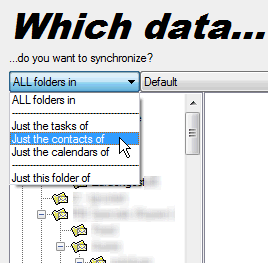
If you're creating a new task, you can let Easy2Sync for Outlook support you configuring the task. The software offers wizards for typical special cases, e.g. for synchronizing only the contacts:
Other folders:
Of course, this will also work with other folders. There are wizards for the most important folders, all other folders can be configured either manually (button "Advanced" for both data storages) or with the wizard "Folders with unequal names".
Can Easy2Sync for Outlook synchronize my database?
No. You can use the sister product Easy2Sync for Files to synchronize the files where the database is stored. But a synchronization on data row level is not possible.
Can Easy2Sync for Outlook synchronize my files?
No. You should use the sister product Easy2Sync for Files to synchronize your files. Or get both products in a bundle with discount.
Can Easy2Sync for Outlook synchronize the system time with the internet?
No. Easy2Sync for Outlook synchronizes e-mails in networks.
Can Easy2Sync for Outlook synchronize my Smartphone / cell phone?
Partly. Easy2Sync for Outlook can synchronize contacts/appointments with the Google servers. And they are automatically synchronized with Android devices. In addition, all folders that you integrate into Outlook with third-party software (with write permissions) can usually be synchronized.
Search keywords: iPhone, iOS, Galaxy, Android, Entourage, Ipaq, SL65, a700, a780, blackberry, ce, clie, cx65, ericson, ericsson, handy, hotmail, hotsync, ipaq, ipod, lyra, m65, mobile, motorola, nokia, p800, p900, p910a, palm, pda, phone, pocket pc, pocketpc, qtek, s710a, samsung, siemens, sms, sony, t610, t630, treo, uiq, unix, win ce, wince, windows ce, xda, zire
Can Easy2Sync for Outlook synchronize every x minutes? when my computer is shut down?
Both questions: Yes.
Can Easy2Sync for Outlook use an USB connection to synchronize?
Depends on the manufacturer of the USB cable. Some deliver a software which creates a connection, but does not allow other programs to use it. You can test it. If you can open a file on the other computer with an application (for example Microsoft Word), then you have a full-featured windows network. And Easy2Sync for Outlook will work. (Or simply try the Freeware Edition.)
Warning: Never use the standard USB cables to connect PCs. They were not designed for this and may damage your hardware. Only use cables that are explicitly meant for this.
Can Easy2Sync for Outlook synchronize my Outlook-Version(s)?
We successfully tested Easy2Sync for Outlook on this software:
· Microsoft Outlook 2021 (32-bit and Intel/AMD 64-bit, incl. combinations)
· Microsoft Outlook 2019 (32-bit and Intel/AMD 64-bit, incl. combinations)
· Microsoft Outlook 2016 (32-bit and Intel/AMD 64-bit, incl. combinations)
· Microsoft Outlook 2013 (32-bit and Intel/AMD 64-bit, incl. combinations)
· Microsoft Outlook 2010 (32-bit and Intel/AMD 64-bit, incl. combinations)
· Microsoft Outlook 2007
· Microsoft Outlook 2003
· Microsoft Outlook 2002/XP
· Microsoft Outlook 2000

· Microsoft Windows 10
· Microsoft Windows 2012
· Microsoft Windows 8.1
· Microsoft Windows 8
· Microsoft Windows 7
· Microsoft Windows Vista
· Microsoft Windows 2003
· Microsoft Windows XP
· Microsoft Windows 2000
· Microsoft Windows NT
· Microsoft Exchange 2019
· Microsoft Exchange 2016
· Microsoft Exchange 2013
· Microsoft Exchange 2010
· Microsoft Exchange 2007
· Microsoft Exchange 2003
· Microsoft Exchange 2000
· Microsoft Exchange 5.5
· Microsoft 365 (Office 365)
Easy2Sync for Outlook does NOT work with the following software:
· Microsoft Outlook Express
· Microsoft Business Contact Manager (BCM)
· Microsoft Entourage
· All e-mail programs from other manufacturers
· ARM
· Outlook One/Monarch
Supporting these clients is currently not planned. Sorry.
Combinations (e.g., Outlook XP on Windows 2000 and Outlook 97 on NT) can be synchronized, too!
One exception: Starting Outlook 2003 a new file format (unicode) can be used. Since unicode files cannot be understood by older Outlook versions (2002 and older), you can synchronize Outlook 2003 with older Outlook versions only if you either convert the unicode PST files to non-unicode PST files (Microsoft describes here how to do this) or run Easy2Sync on the computer with the newer Outlook version (because its drivers support both file types).
Search keywords: Entourage, Mozilla, Netscape, Poco-Mail, The Bat, Thunderbird
Can Easy2Sync for Outlook synchronize my Outlook while it is OPEN?
Yes, since version 6.00 without limitations.
If you already used a version prior to 6.00:
This requires that you delete the old tasks and recreate them. A bridge file is no longer needed, the computers are synchronized directly.
Can Easy2Sync for Outlook synchronize my huge mail file?
We successfully tested Easy2Sync for Outlook with PST files containing up to 80000 e-mails and 4 GB in size. And we were far away from any limits. And we have reports from customers who successfully use our software with even bigger mail files.
Can Easy2Sync for Outlook synchronize my IMAP/OST/CST mail folder?
No, currently only PST files and Microsoft Exchange accounts can be synchronized.
Can Easy2Sync for Outlook synchronize my Exchange server?
Yes, Easy2Sync for Outlook can synchronize with Exchange servers, no matter which version. (If you don't have an Exchange server: Don't worry, it's not required.)
The progam can synchronize either an Exchange server account with a PST file or synchronize two Exchange server accounts. It can synchronize the account completely or in parts (like only the contacts), even if the parts have different names (e.g. "contacts" with "contactos"). Both public folders and user-specific folders can be synchronized.
Limitations: Easy2Sync for Outlook can synchronize individual Exchange server accounts. But not entire Exchange servers (with thousands of accounts).
Please see the Exchange FAQ for more information.
Do you need a special network connection?
No. Any network connection that is supported by Windows, works with Easy2Sync for Outlook, too. So, if you can see the other computer's files in an explorer window on your PC, this is already enough.
Easy2Sync works for example with local networks via cable or wireless (WLAN). (For USB cables, see this page.)
Do you need Easy2Sync for Outlook on both computers?
Yes, you only to install it on all involved computers. On the main computer (which you can choose as you like), you will need to create 1 task. Example: If you want to sync desktop and notebook, then install Easy2Sync for Outlook on both and create a task on the desktop.
Can I synchronize 3 (or more) computers?
Directly in one step it's not possible. Simply use several tasks (requires the Business Edition or several licenses). Synchronize computer A with computer B and after that computer B with computer C.
This answer also applies to Easy2Sync for Files.
See also:
· How many licenses do I need?
How do I synchronize without network?
Without network it's uncomfortable. You'll need a mobile data storage (rewritable CD, memory stick, USB hard disk) which can hold the entire PST file. Synchronize it with computer 2 and after that with computer 2. A tip: Do this only if you cannot create a network due to technical reasons. Nowadays networks are so cheap and easy to configure that the workaround with the mobile data storage doesn't pay.
A tip: Choose this way only if a network is not possible due to technical reasons. Networks are nowadays so cheap and easy to set up that using a storage medium doesn't pay off.
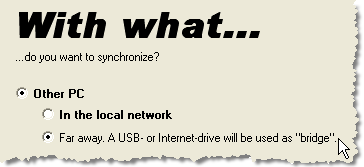
If it really has to be without network: Perform the normal configuration steps on the PCs. On the page "With what do you want to synchronize" choose the option "far away/bridge file":
Can I synchronize over a VPN?
Normally yes. Easy2Sync for Outlook just requires a (simulated) local network connection.
Can I synchronize over the internet?
Currently, Easy2Sync for Outlook cannot synchronize PST files over the internet. The only way for this if you configure a VPN yourself to connect the computers "directly".
Note: This restriction does not apply to Exchange servers. You can synchronize any Exchange server that can be reached by your local Outlook (or via any mail profile that could be used in your local Outlook).
How can I turn off the splash screen?
In Windows please edit the shortcut you're using to start Easy2Sync and add the parameter /NoSplash.
<< Back · Download Freeware Edition · Buy Business Edition >>
Search keywords: splashscreen, start screen, start dialog, start up dialog, loading dialog, loading screen
What do I do if calendar items are moved by 1 hour or cover 2 days?
Please make sure that you are using the same time, time zone, and daylight savings time setting on both machines. This will resolve the problem and Outlook will display the correct times.
Search keywords: calendar items, time zone, time, delayed, moved, 2 days, daylight savings time
How can I fix MAPI_E_NOT_ENOUGH_DISK / MAPI_E_STORE_FULL?
There a 3 possible causes for this problem:
1. The hard disk that contains the pst file is full.
2. You PST file is almost 4GB bit and you're using FAT32. This file system is often used on USB-sticks and -drive and supports max. 4GB per file.
3. You PST file is almost 2GB bit and you're using the old PST file format. That supports max. 2GB per file. Microsoft explains here how to convert it into the new format.
Please note: All these limits are in Outlook or in the file system. Easy2Sync does not have any size limits.
To make PST files smaller in general you can delete old e-mails, empty the deleted-items-folder and compress the file (Rightclick the topmost item in the folder tree > Properties > Advanced)
Search keywords MAPI_E_NOT_ENOUGH_DISK, 0x8004010d, -2147221235, MAPI_E_STORE_FULL, 0x8004060c, -2147219956
How can I fix 'The operating system is not presently configured to run this application'?
Please use the Office repair function:
Start > Control Panel > Programs > Right-click on "Microsoft Office" > Change > Repair
Exchange questions
Can I sync with Exchange accounts?
Yes. All accounts listed under "Start > Control panel > Mail > Profile" can be synchronized by Easy2Sync for Outlook.
I want to sync only my Exchange calendar / contacts. Is that possible?
Yes. When creating the task, simply choose the desired folders.
Can I sync accounts from two different Exchange servers?
Yes. Simply make sure that you have a profile (Start > Control panel > Mail > Profile) for each server and then choose these profiles in Easy2Sync for a sync.
Can I sync an Exchange account with a PST file?
Yes.
Can I sync "Public folders"?
Yes, you can sync "Public folders" with other folders (public or private). For example you can sync a public calendar folder with a user's private calendar folder.
Can I sync "Shared" Exchange folders?
Sorry, no. Shared Exchange folders cannot be synchronized. You need full access the respective account. (Note: This answers applies to Exchange only and NOT to shared folders in a Windows file system.)
Sync Outlook ·
Synchronize Files ·
Sitemap ·
PAD ·
EULA · Uninstall · Mobile version ·
© 1999-2024 ITSTH